
Installation
- Install DisputePack from the Shopify App Store or your dev-store admin.
- Approve the scopes: orders, customers, and Shopify Payments disputes.
- On first load, DisputePack syncs open disputes and backfills evidence where your plan allows.
For local development, run pnpm start and open the app from your dev-store admin.
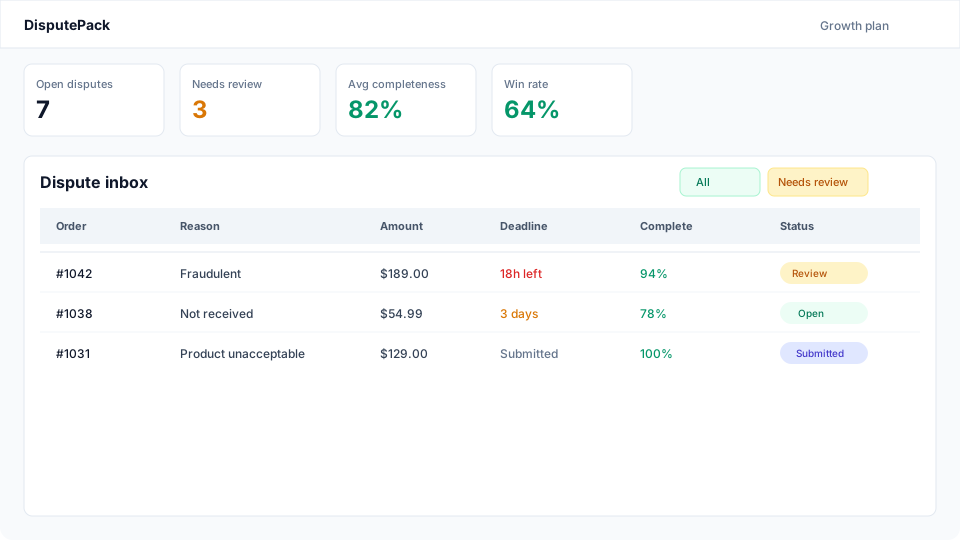
Dispute inbox
The inbox shows every dispute with amount, reason, status, deadline and completeness — plus money tiles for what's at stake and what you've recovered. Filter for urgent (<48h), needs review, submitted, won, or lost.
Dispute detail
Each case includes order line items, billing/shipping addresses, payment signals (AVS/CVV), fulfillment tracking, and a reason-code checklist.
- AI rebuttal — drafted after evidence is gathered; edit and save before export.
- Merchant uploads — attach PDF/JPG/PNG files as exhibits (plan limits apply).
- Completeness gate — PDF generation is blocked until required checklist items are present.

PDF evidence pack
Click Generate PDF to build a structured, Shopify-ready pack:
- Cover page — order, dispute ID, reason, amount, deadline
- Rebuttal summary — your edited draft
- Exhibits A–E — order, payment, fulfillment, customer, policies
- Exhibit F — merchant uploads
- Evidence checklist appendix
Download it and submit through Shopify Admin → Orders → the dispute response form. Mark it submitted in DisputePack when done.
Alerts & settings
Configure your notification email and alert toggles in Settings:
- 72h / 48h / 24h deadline reminders (48h/24h unlock on Starter and above)
- Daily digest when open disputes exist
- New-dispute email on webhook create
- Default AI rebuttal tone: professional, concise, or detailed

Billing & plans
Paid plans bill through the Shopify Billing API with a 14-day trial and an annual option (2 months free). Usage resets monthly; new-dispute processing pauses at your plan limit with an upgrade prompt.

Need help?
Email support@disputepack.app or use the contact form.